VixlVixl
Docs
Changelog
GitHub
Docs
Changelog
GitHub
  • Get Started

    • Overview
    • Philosophy
    • Installation
    • Set up providers and models
    • Add a project
    • Create a project group
    • Your first chat
  • Concepts

    • How Vixl works
    • Chat modes
    • Permissions and approvals
    • Projects and home chats
    • Models and roles
    • Context
    • Code graphs
    • The .vixl directory
  • Using Vixl

    • Manage chats
    • Queue and stop messages
    • Review and restore changes
    • Compact and hand off long chats
    • Export a transcript
    • Work with plans
    • Orchestrate sub-agents
    • Best practices
    • Use the workbench
    • Shortcuts and the command palette
  • Customize

    • Providers
    • Models
    • MCP servers
    • Skills
    • Custom agents
    • Rules and AGENTS.md
    • Language servers
    • Appearance
    • Permission settings
  • Reference

    • settings.json
    • mcp.json
    • Custom agent frontmatter
    • SKILL.md format
    • Keyboard shortcuts
    • Chat statuses
    • .vixl layout
    • Managed components
  • Resources

    • Troubleshooting
    • FAQ
    • Privacy
    • Comparison
    • Roadmap
    • Brand and press
    • Changelog

Review and restore changes

After a turn that changed files, the thread shows those paths on the agent message (Vixl file checkpoints). Use restore on a turn when you want those paths rolled back to the checkpoint taken before that message.

Git tools and git neutrality (the agent does not commit unless you ask) are on Chat modes.

Restore files from a turn

Before the agent mutates a file, Vixl captures a baseline keyed to the user message that started that turn. After a turn that changed files, the thread shows a count such as 3 files changed. Expand it for paths.
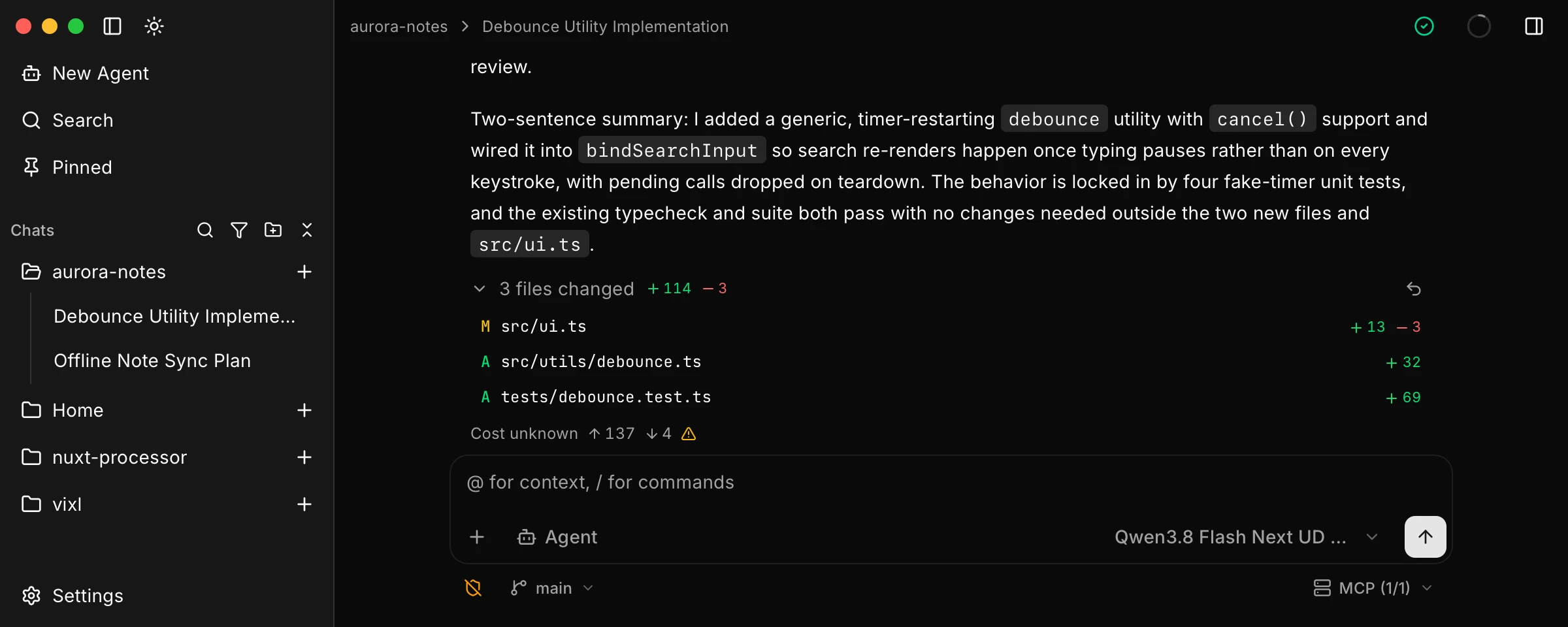
Agent reply with three files changed expanded, listing added and modified paths

  1. Expand the file list on the agent message.
  2. Click Restore files and confirm.

That rolls those paths back to the checkpoint taken before the turn (created files are removed) and discards the conversation after the preceding user message. Manual edits on those paths are overwritten too. If later turns also touched files, those later mutations are reverted with it.

Restore is disabled while a turn is live and on a read-only sub-agent thread.

Keep or revert when you edit a send

If you edit a user message (or retry) after later file mutations, Vixl asks Keep files or Revert files. Keep files leaves disk unchanged. Revert files rolls those paths back. Either way, the conversation after that point is discarded.

Edit this page
Last Updated: 10/11/26, 7:48 PM
Prev
Queue and stop messages
Next
Compact and hand off long chats