
Work with plans
A plan is a PLAN.md you keep. Plan mode researches the repo and writes that file. Build or Orchestrate then implements it, so the next run is grounded in decisions you already paid for, not in a discarded chat turn. Plans persist; that opinion is on Philosophy.
The file lives at .vixl/plans/<id>/PLAN.md, where <id> is a slug of the title plus a timestamp. Project chats write under the project .vixl. Home chats write under ~/.vixl/plans, the personal tree. Paths are on The .vixl directory.
What PLAN.md contains
YAML frontmatter, then a markdown body.
Frontmatter fields you will see:
| Field | What it is |
|---|---|
id | Folder name: slug of the title, then YYYY-MM-DD-HHMMSS |
title | Plan title |
createdAt | ISO timestamp |
mode | Always plan |
sourceChatId | Set when the plan was created from a chat |
todos | List of { id, content, status } |
Todo status is pending, in_progress, completed, or cancelled. Keep each content line short and verb-first. Detail belongs in the body.
After you start Build or Orchestrate, Vixl also writes builtAt, lastBuildChatId, and lastBuildModel. If those chat ids point at chats that no longer exist, Vixl clears them.
When Plan mode calls create_plan, the built-in skill asks for these body sections in order: Summary, Context, Architecture (one mermaid diagram), Approach, Test plan. The template also has optional Risks and Open questions. A plan you create from the form only needs valid frontmatter and a body; mermaid is rendered when present, not required by the writer.
The plan tab is a rendered view. Edit todos in the YAML of PLAN.md (open it from the file tree), or let the implementing agent update them during a run.
Create a plan in Plan mode
Plan mode can research the repo. It cannot mutate source files. Agent mode can also call create_plan; you still wait on the plan tab before implementation.
- Set the mode picker to Plan.
- Describe the work in the chat input.
- Send.
When create_plan succeeds, Vixl opens a plan tab and the agent is told to stop. Implementation tools stay blocked until you click Build or Orchestrate (the blocked set is on Chat modes). update_plan and update_plan_todo still work, so you can revise while you wait.
Create a plan from Settings or a project
Settings > Plans and the project Plans tab can create a plan without an existing chat. New plan offers:
- Chat: opens a new Plan-mode chat so the agent can research and call
create_plan. - Form: title, todos, and description, then Create plan.
Click a row to open the plan tab.
The plan tab
The tab shows the title, the todo list (Pending, In progress, Completed, Cancelled), then the markdown body. Mermaid fences render as diagrams.
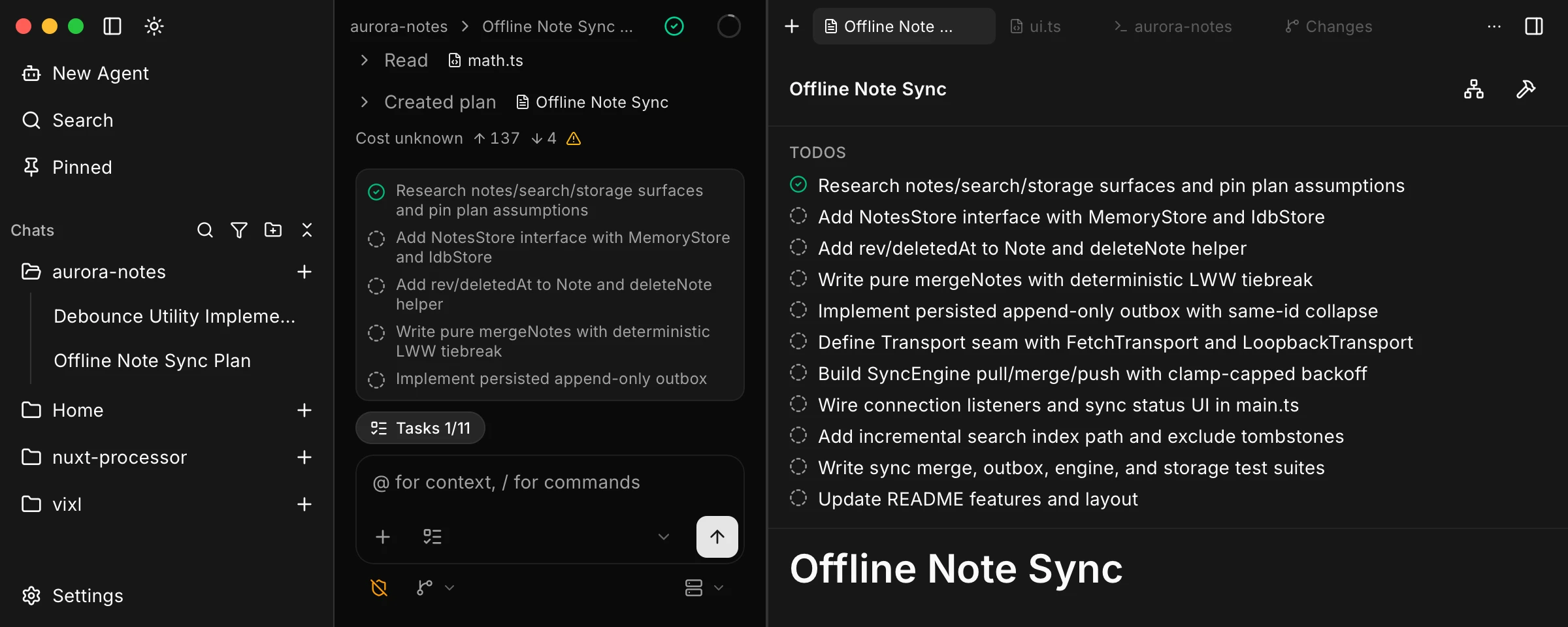
While any todo is still open, the header has Orchestrate and Build. If the linked build chat is already running, Build becomes Open the active build chat, and Orchestrate is disabled. When every todo is completed or cancelled, both buttons hide and a Done check appears. A plan with no todos keeps the buttons.
If the document does not parse, those actions are disabled. You need at least one configured provider.
Build vs Orchestrate
Build is a single Agent-mode run against the plan. Orchestrate is an Orchestrator-mode run: the parent guides nested sub-agents and does not write files itself. Why that split is cheaper is on Best practices. How the parent and workers behave is on Orchestrate sub-agents.
Build
Build opens a dialog. Pick the model (it defaults from the Agent role). Build in a fresh chat (new context) is off by default. Confirm with Build.
Unchecked, Vixl continues in the last build chat recorded on the plan, else the chat that created it, if that chat still exists and is not running. If neither is usable, Vixl creates a new chat titled with the plan title. Checked, Vixl always creates a fresh chat, so the next agent sees the plan file rather than the planning transcript.
Build starts (or resumes) that chat in Agent mode, copies the plan todos into the chat task list, and sends a handoff that tells the agent to read PLAN.md and complete those todos. If that chat is already running, the start is refused.
Orchestrate
Orchestrate opens a dialog with Parent (defaults from the Orchestrator role) and Subagent (defaults from the Subagent role). You need both. Confirm with Orchestrate.
There is no fresh-chat checkbox. Chat reuse is the same as Build without the checkbox: last build chat, else the source Plan chat, else a new chat titled with the plan title.
Orchestrate starts (or resumes) that chat in Orchestrator mode, locks the nested sub-agent model on the chat, and sends a handoff that tells the parent to spawn one background sub-agent per todo. The parent updates plan todos as results come back, and may revise the plan body if scope changes.
After a start
Vixl writes builtAt, lastBuildChatId, and lastBuildModel on the plan, then opens the chat. The handoff is the next user message in that thread.
Stay on the same model you planned with if you want the host to reuse a cached prefix. Switch the model, or check Build in a fresh chat, when the planning thread is noise. See Best practices.